
Hello fellow bloggers! Today I want to share a few quick and easy SEO tips for blogs.
What be this crazy SEO hoozy whatsit you ask? SEO stands for Search Engine Optimization, which is simply a way to ensure your posts are optimized for web crawlers so they will identify your blog post as something that might meet the needs of searchers.
 The option to add a search description can be found in the right-rail post settings. You should fill this out for every single post. First, it provides searchers with a description when your post pops up in their search query. If you don't fill it out the beginning text from your post will pop up instead, and you may lose potential readers.
Admittedly my tips are geared towards Blogger since that is the platform I'm most familiar with, but some nuggets should also work for Wordpress and other formats.
Tip #1: Always include a search description for your posts
Second, it provides search crawlers with critical key words that help them identify whether or not your post is relevant to a searcher's query. If you leave this area blank, you are missing out on a critical opportunity to improve your blog's
searchability.
searchability.
Tip #2: Include your blog name in your search description
Type the title of your blog into Google or Bing - where does it pop up on the list of search results? If you're not happy with the position, it may be because crawlers aren't linking your blog name to your blog.
Crawlers identify potential content fits based on key words that appear throughout sites. If there is a common term or phrase used on a site that matches a search query, it stands a better chance of being a good fit.
A simple way to improve your blog name's searchability is to include it in all of your individual posts' search descriptions. For example, for this post I might write "Thinking to Inking blog post detailing SEO strategy tips and tricks for bloggers..."
This increases the frequency of that key word combination within your pages, and thus the chance for crawlers to link your blog name to your blog's content.
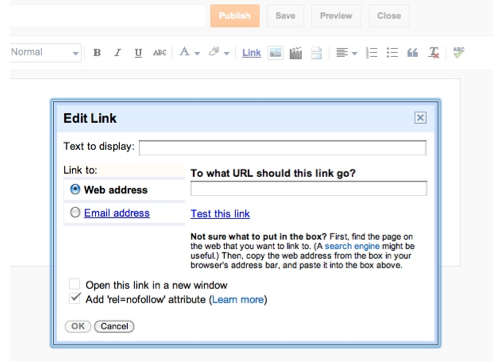
Tip #3: Click "add rel=nofollow attributes" when adding hyperlinks
When adding a hyperlink to your post, the window to the right should appear. At the bottom is an option called rel='nofollow' attribute - clicking this option tells crawlers to deprioritize the hyperlink when crawling through your content, and it keeps the crawlers on your page. Not clicking it will jump crawlers to the page you've hyperlinked to, and will impact your search ranking by including all of the content from the site you've linked to.
Tip #4: Always include title and alternate text descriptions for pictures
You want to include both a title and alternate text for every image you include in your posts. First, this is helpful for the visually impaired, and the alternate text is what will appear if the image for some reason doesn't load. Second, it improves both text and photo searchability by acting as the perfect location for additional keywords.
In Blogger draft mode, when you paste in a pic a menu bar should appear. If it doesn't, simply click on the photo and it will pop up. Click on the properties option. A pop up with blanks for title text and alt text will appear. In the title text space, give your picture a name, and make it descriptive of the picture as well as your post topic. In the alt text, provide some additional nuggets about the pic and your blog topic. Voila! You've just bolstered your post's search.
Tip #5: Use labels as additional content keywords
The label option is found in the post settings right rail (see picture above). Adding content labels organizes your site's content by putting it into topic buckets. They also act as key words for web crawlers. You want to include descriptive words that link to your post and that may match query text. Think of what you type into search engines - these are the type of descriptive labels you want to include in your blog posts.
Tip #6: Leverage headings, titles and bolded terms
Web crawlers distinguish regular text from headings and titles. They also give priority to bolded terms, using the assumption that anything bolded is more important than standard text. A simple way to ensure web crawlers identify your most relevent and important text is to add descriptive headings and bold important, relevent content so that crawlers will give it greater importance. If you notice in my opening paragraph I bolded SEO and search engine optimization. This will hopefully improve the odds of this post popping up when someone searches for information about how to improve their blog's searchability.
Tip #7: Titles matter
Because crawlers give priority to headings and bolded text, the title of your post is very, very important. Crawlers use titles as critical key words, so if your title is not descriptive of your content your post may get passed over even though it's relevent to the search query. That's not to say that you can't use fun titles for your posts, but if you want your post to be more accessible to new readers, aim to use descriptive titles versus cute and clever one.
Have any additional search tips and tricks? If so, please share them in the comments section.
Happy writing!
Have any additional search tips and tricks? If so, please share them in the comments section.
Happy writing!
